Ecommerce stores have a simple problem that is not always easy to solve.
They need more product content.
A store may have hundreds of products, but only a few of them get proper marketing attention. The bestsellers get banners, ads, reels, product videos, and email campaigns. But many other products sit quietly in the catalog with basic images and short descriptions.
This is common because content production takes time.
A traditional product video needs planning, scripting, shooting, editing, voiceover, captions, and publishing. If a store has 20 products, this may be manageable. If it has 200, 500, or 2,000 products, the workload becomes heavy.
That is where AI product videos become useful.
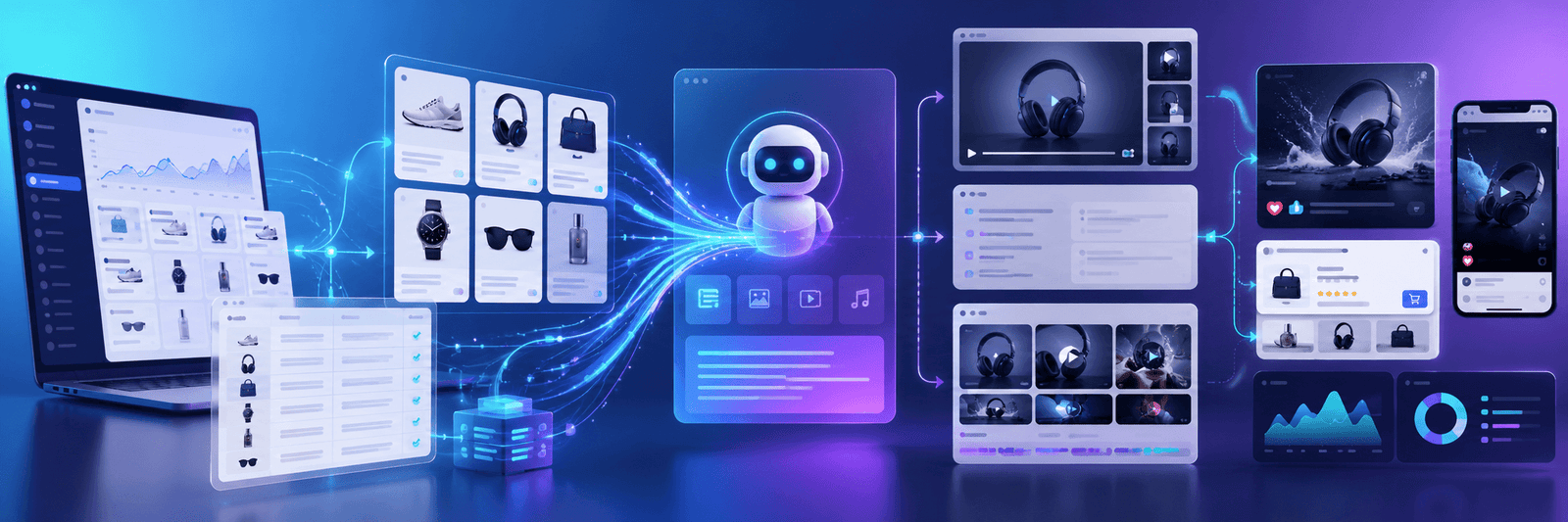
AI can help ecommerce teams turn existing product data into short product videos faster. Instead of starting from scratch every time, a store can use product titles, descriptions, features, images, categories, prices, and customer benefits to create useful video content.
This does not mean every brand should replace human creativity with AI. It means ecommerce teams can use AI to produce more practical product content, especially for product pages, social media, ads, emails, and seasonal campaigns.
For online stores, AI product videos are not just a content trend. They can support better product understanding, stronger trust, and higher conversion potential.
What Are AI Product Videos?
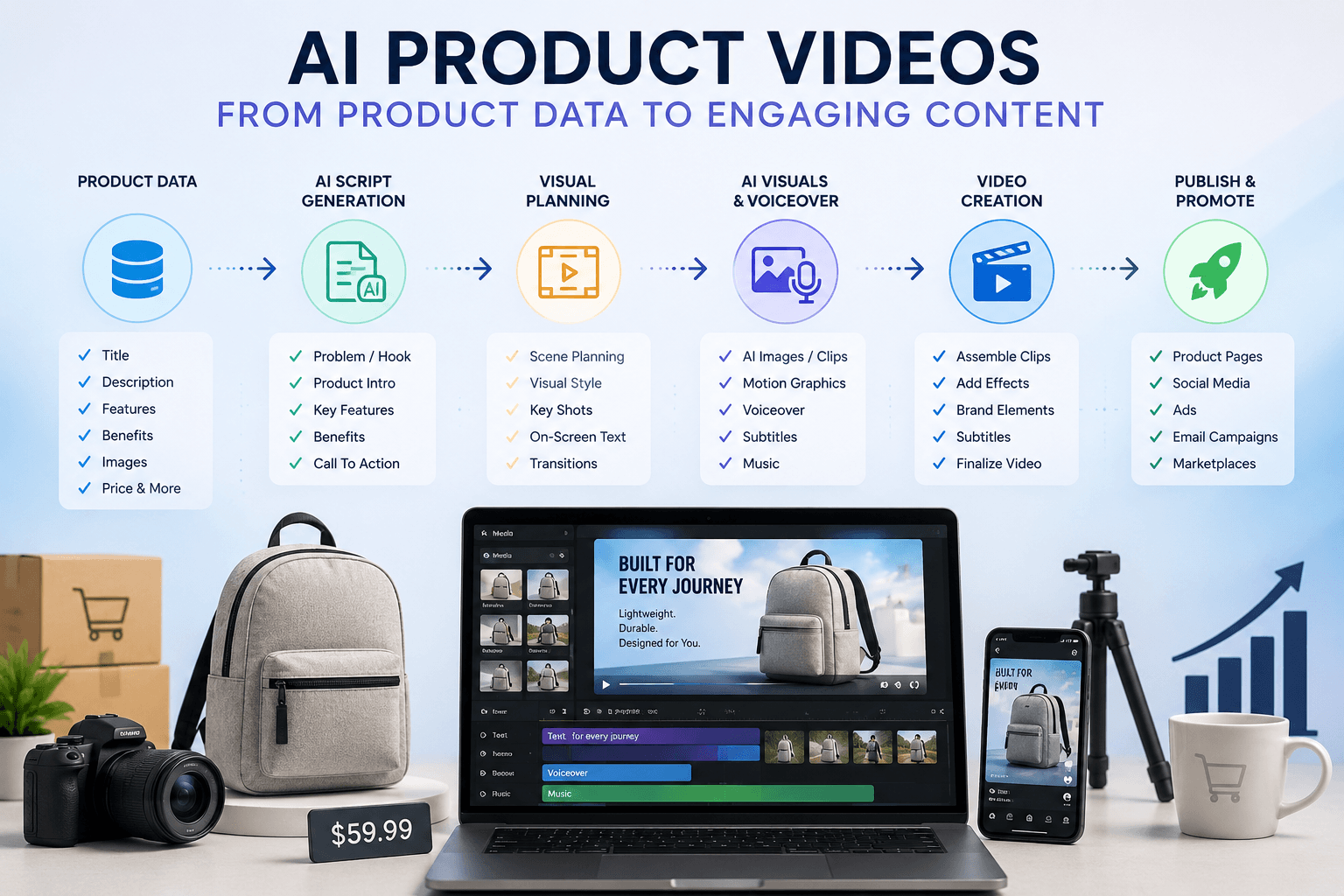
AI product videos are videos created with the help of artificial intelligence tools.
They can be made from product images, catalog data, product descriptions, feature lists, customer reviews, scripts, voiceovers, and visual prompts.
A simple AI product video may include:
- A product hero shot
- Key feature highlights
- Product benefits
- Use-case visuals
- Voiceover or subtitles
- A short call to action
For example, a store selling backpacks can use AI to create a short video showing the backpack, highlighting storage space, water resistance, laptop compartment, and travel use.
A skincare brand can create product videos explaining ingredients, skin type, usage steps, and benefits.
A furniture store can create videos showing dimensions, room placement, material, care instructions, and delivery details.
The purpose is not always to create a cinematic advertisement. In many cases, the goal is simpler: help the customer understand the product faster.
That is why AI product videos are a strong fit for ecommerce.
Online shoppers cannot touch or try the product. They depend on product images, descriptions, reviews, and videos. A short video can bring all of that information together in a more engaging way.
Why Product Videos Matter in Ecommerce
Product videos matter because they reduce uncertainty.
When a shopper visits a product page, they are often asking silent questions:
- What does this product look like in real use?
- How big is it?
- How does it work?
- What are the key features?
- Is it right for me?
- Can I trust this product?
- Is it worth the price?
Images answer some of these questions. Descriptions answer others. But video can combine visuals, movement, explanation, and context.
A good product video can show the product from different angles, explain the main benefits, highlight important details, and guide the shopper toward a decision.
This is especially useful for products where customers need more confidence before buying.
Examples include:
- Fashion and accessories
- Electronics
- Furniture
- Beauty and skincare
- Fitness products
- Home decor
- Kitchen tools
- Baby products
- B2B equipment
- Subscription boxes
Product videos can also help with ads and social media. Many people scroll quickly. A short product video can catch attention faster than a static product image.
But producing videos manually for every product can be expensive and slow. AI makes the process more practical.
The Content Bottleneck Ecommerce Stores Face
Many ecommerce teams are not short of products. They are short of content bandwidth.
They may have:
- Product images
- Basic descriptions
- Specification tables
- Customer reviews
- Inventory data
- Category information
- Product benefits
- Brand guidelines
But turning that information into product videos is another job.
The marketing team may not have enough time. The design team may be busy. Video editors may be expensive. Product information may change often. Seasonal campaigns may need new versions. Ads may need multiple formats.
This creates a bottleneck.
As a result, only a small part of the catalog receives strong video content.
AI workflows can help solve this bottleneck by creating a repeatable system.
Instead of manually creating each video from zero, the store can create a process where AI helps with the repetitive parts:
- Reading product data
- Writing a short script
- Planning visuals
- Creating image or video scenes
- Adding voiceover
- Adding subtitles
- Preparing different formats
This gives teams a faster way to create product content at scale.
How Multi-Agent AI Workflows Help
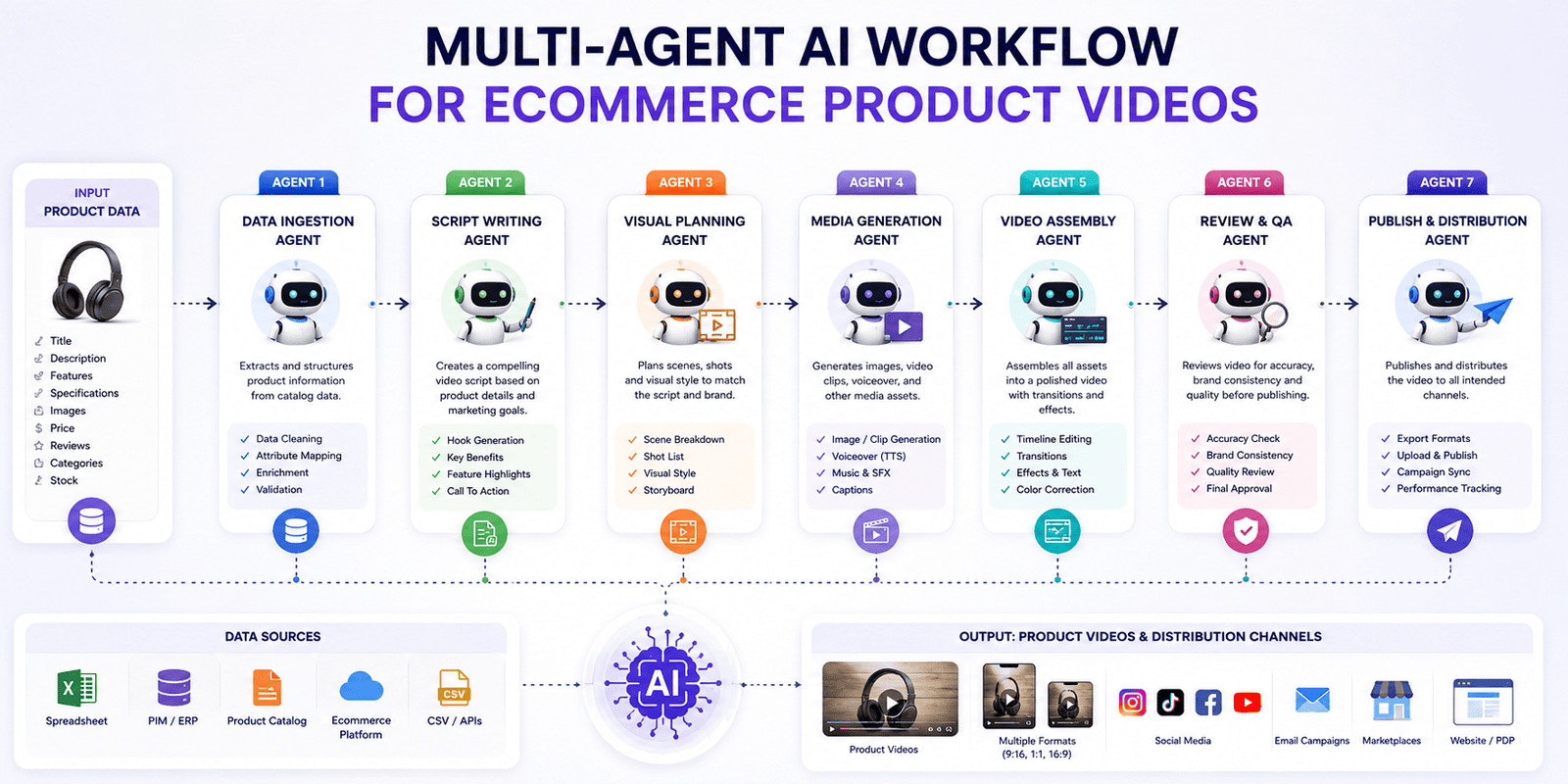
A multi-agent AI workflow means different AI agents handle different parts of the content process.
Instead of asking one AI tool to do everything, the work is divided into smaller tasks.
This is important because product video creation has many steps. A single prompt may create a rough idea, but it may not produce consistent, reliable, brand-friendly videos.
A better approach is to assign each stage to a specific agent.
For example:
- One agent reads product data.
- One agent writes the script.
- One agent creates the visual plan.
- One agent generates media assets.
- One agent assembles the video.
- One agent prepares the video for publishing.
This kind of workflow is useful because each agent has one clear job.
The script agent does not need to worry about video editing. The visual planning agent does not need to write the full marketing message. The assembly agent does not need to understand customer psychology.
Each step becomes easier to control.
Step 1: Clean and Structure Your Product Data
Before creating AI product videos, the most important step is product data cleanup.
AI tools work best when the input data is clear.
If your product catalog is messy, the output will also be messy.
For example, if one product has a detailed description, another has only two words, and another uses internal warehouse terms, AI will struggle to create consistent videos.
A good product data structure should include:
- Product name
- Product category
- Short description
- Key features
- Main benefits
- Target customer
- Price range
- Product images
- Color or variant details
- Size or dimensions
- Material or ingredients
- Usage instructions
- Warranty or return notes
For ecommerce brands, this step is valuable even without video automation.
Clean product data improves product pages, search filters, product feeds, structured data, AI search visibility, and customer experience.
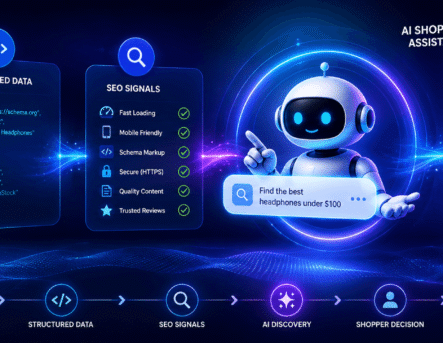
This also connects with agentic commerce. AI shopping agents need clear product details to understand and recommend products. A store with clean product data is better prepared for both AI-generated videos and AI-assisted shopping.
You can also read Zeroradius’ guide on agentic commerce and ecommerce store optimization to understand why clear product data matters for AI-powered shopping.
Step 2: Create a Script Template
AI works better when it has a clear structure.
Instead of asking AI to “create a product video script,” give it a repeatable template.
A simple ecommerce product video script can follow this format:
- Hook: What problem or desire does the product address?
- Product intro: What is the product?
- Feature 1: What is the first key feature?
- Feature 2: What is the second key feature?
- Feature 3: What is the third key feature?
- Benefit: Why does it matter to the customer?
- CTA: What should the viewer do next?
For example, for a travel backpack:
- Hook: Need a compact backpack for short trips?
- Product intro: This 28L waterproof backpack is designed for weekend travel and daily commuting.
- Feature 1: It includes a padded laptop compartment.
- Feature 2: The water-resistant fabric helps protect your essentials.
- Feature 3: Multiple pockets keep small items organized.
- Benefit: It gives you enough space without feeling bulky.
- CTA: Explore the product and choose your color.
This format keeps the video focused.
It also avoids a common AI mistake: long, generic scripts that sound nice but say very little.
A product video does not need to explain everything. It should quickly show what matters most.
Step 3: Build a Visual Plan
A script alone is not enough.
The video also needs a visual plan.
This means deciding what the viewer should see during each part of the script.
For ecommerce videos, useful visual scenes may include:
- Product hero shot
- Product close-up
- Lifestyle use
- Feature detail
- Size or scale comparison
- Variant display
- Packaging shot
- Before-and-after use
- Product page or cart visual
- Final product showcase
For example, if the script says, “The backpack includes a padded laptop compartment,” the visual should show the laptop compartment clearly.
If the script says, “Designed for weekend travel,” the visual may show the backpack beside travel essentials.
The visual plan helps AI image or video tools generate relevant scenes. It also helps maintain brand consistency.
Without a visual plan, the AI may create random visuals that look attractive but do not explain the product.
Step 4: Generate Images, Clips, Voiceover, and Subtitles
After the script and visual plan are ready, AI tools can generate the media assets.
This may include:
- Product-style images
- Short AI video clips
- Motion graphics
- Voiceover
- Background music
- Subtitles
- Callout visuals
For many ecommerce stores, a full AI-generated video may not be necessary at first.
A simple video made from product images, motion, captions, and voiceover can still be effective.
For example, you can create a 20-second product video using:
- Existing product image
- Close-up crop
- Feature caption
- Lifestyle background
- Voiceover
- Subtitles
- Final product card
This is easier to control than fully generated video.
It is also safer for brand consistency because it uses real product images.
AI-generated visuals can be useful, but they should be reviewed carefully. Products should not be misrepresented. If the AI changes the product shape, color, size, or material, that video can confuse customers.
Accuracy matters.
Step 5: Assemble the Video
The assembly stage brings everything together.
This includes:
- Arranging clips in the right order
- Matching visuals to the script
- Adding voiceover
- Adding subtitles
- Adding music
- Adjusting timing
- Exporting the final video
For ecommerce, short videos often work best.
A practical product video may be:
- 15 seconds for social media ads
- 20 to 30 seconds for product pages
- 6 to 10 seconds for short promotional loops
- 45 to 60 seconds for detailed product explainers
The right length depends on the product and platform.
For example, a simple T-shirt may only need a short video. A technical product may need a longer explainer.
Do not make videos longer just because AI can generate more content. The video should stay focused on the customer’s decision.
Step 6: Review Before Publishing
AI automation should not mean publishing without review.
Human review is important, especially in the beginning.
Check every video for:
- Product accuracy
- Correct price or offer
- Correct color and variant
- Clear message
- Brand tone
- Natural voiceover
- Spelling and subtitle accuracy
- No misleading claims
- No visual errors
- Good mobile readability
This is especially important for regulated or sensitive categories such as health, beauty, finance-related products, children’s products, or technical equipment.
Even for normal ecommerce products, the brand should stay responsible for the final content.
AI can speed up production. It should not remove quality control.
Where Ecommerce Brands Can Use AI Product Videos
AI product videos can be used in many places across the ecommerce journey.
Product Pages
Product pages are one of the best places to use product videos.
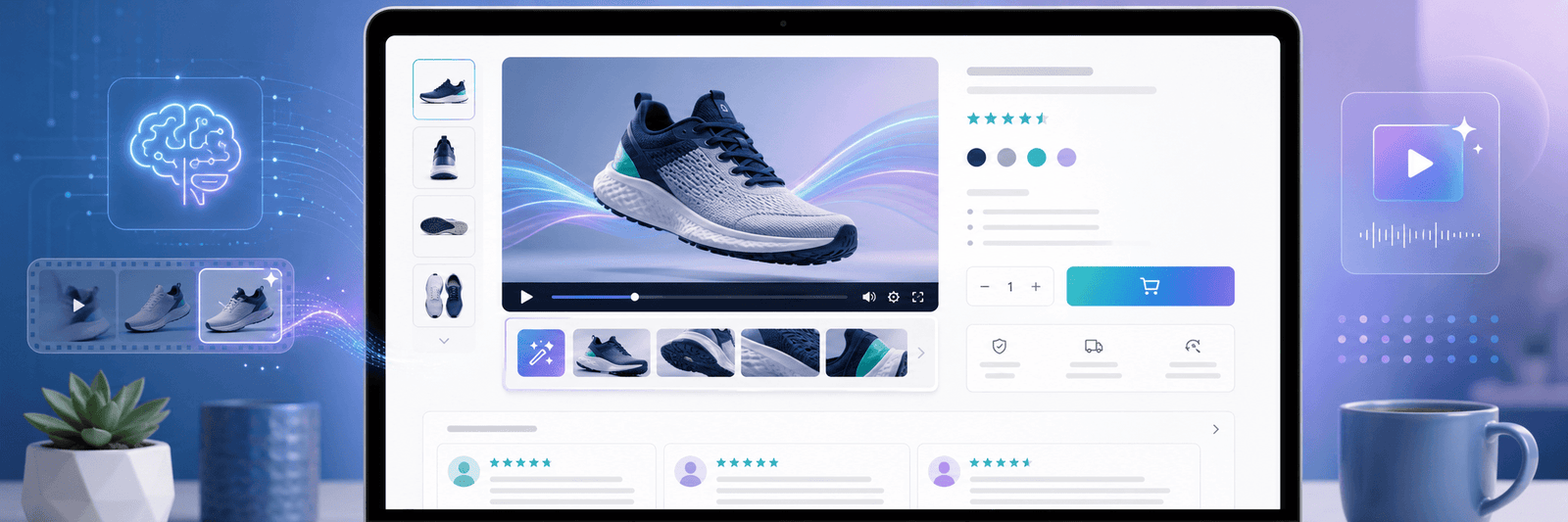
A short video near the product gallery can help customers understand the product faster.
It can show:
- How the product looks
- How it works
- What makes it useful
- What size it is
- How it fits into daily life
This can reduce hesitation and support conversion.
You can also read Zeroradius’ ecommerce conversion optimization guide to understand how better product content can help improve ecommerce performance.
Social Media
AI product videos can help ecommerce brands post more consistently.
A store can create product reels, feature highlights, seasonal videos, and offer videos without waiting for a full production cycle.
Useful social formats include:
- Instagram Reels
- YouTube Shorts
- TikTok videos
- Facebook videos
- LinkedIn product demos for B2B stores
For social media, videos should be short, visual, and easy to understand without sound.
Subtitles matter because many users watch with audio off.
Paid Ads
Product videos can be useful for paid ad testing.
Instead of creating one expensive video, brands can create multiple ad variations.
For example:
- One version focuses on the product problem.
- One version highlights features.
- One version uses customer benefit.
- One version promotes an offer.
- One version targets a specific audience.
This helps the brand test which message works better.
AI can make this faster, but the results should still be measured carefully.
Email Marketing
Product videos can support email campaigns.
For example:
- New arrival emails
- Product launch emails
- Abandoned cart emails
- Back-in-stock emails
- Seasonal promotion emails
- Product education emails
Even a thumbnail linking to a product video can increase interest.
Marketplace and Catalog Content
Some marketplaces and product feeds support video.
If your product category is competitive, video can help your listing stand out.
However, each platform has its own rules, sizes, and quality requirements. Always check before uploading.
How AI Product Videos Support Conversion Optimization
AI product videos support conversion optimization because they help customers understand products with less effort.
Conversion problems often happen when shoppers are unsure.
They may wonder:
- Is this product right for me?
- Does it match the description?
- How does it look in real use?
- What makes it different?
- Can I trust this store?
A good video can answer these questions quickly.
It can improve:
- Product understanding
- Time on page
- Add-to-cart confidence
- Ad engagement
- Social media reach
- Customer trust
- Product education
- Repeat content output
But videos alone will not fix a weak ecommerce store.
If your site is slow, checkout is confusing, product pages are thin, or shipping costs are hidden, videos will not solve the full problem.
AI product videos work best when the ecommerce foundation is already strong.
That means:
- Fast website
- Clear product pages
- Good images
- Strong product descriptions
- Visible reviews
- Clear shipping and returns
- Simple checkout
- Trust signals
- Mobile-friendly design
This is why AI content should be part of a bigger conversion strategy.
How AI Product Videos Support SEO and AI Search
Product videos can also support SEO and AI search visibility when used correctly.
They can make product pages richer and more helpful.
To support SEO, add:
- A clear video title
- A short video description
- Relevant transcript where useful
- Product schema where applicable
- Video schema where applicable
- Descriptive file names
- Optimized thumbnails
- Alt text for thumbnail images
- Fast-loading video embeds
Do not upload heavy videos that slow down your product pages.
Page speed still matters.
If videos make your store slower, they may hurt user experience. Use proper video hosting, lazy loading, compressed thumbnails, and lightweight embeds.
For AI search and agentic commerce, videos can help by making product information clearer. But AI systems still need text and structured data.
A video should not replace product descriptions, specifications, reviews, or schema. It should support them.
Mistakes to Avoid With AI Product Videos
AI product videos can be useful, but poor execution can damage trust.
Avoid these mistakes.
1. Using Dirty Product Data
If the product data is incomplete, the video may become vague or wrong.
Clean data first.
2. Making Generic Videos
A video that says “premium quality, perfect for everyone, stylish and useful” does not help.
Be specific.
3. Misrepresenting the Product
Do not let AI show features, colors, materials, or sizes that are not real.
This can lead to returns and customer complaints.
4. Ignoring Brand Tone
Every video should feel like it belongs to your brand.
Use consistent colors, voice, pacing, and message style.
5. Skipping Human Review
AI can make mistakes.
Review before publishing.
6. Creating Videos That Slow the Website
A video that hurts page speed may reduce conversions.
Optimize file size and loading method.
7. Forgetting Mobile Users
Most ecommerce videos should be easy to watch on mobile.
Use readable captions and clear framing.
8. Publishing Without Testing
Do not assume every video improves conversions.
Test product pages with and without videos. Check add-to-cart rate, checkout starts, conversion rate, and engagement.
A Practical AI Product Video Workflow for Ecommerce Stores
Here is a simple workflow ecommerce brands can follow.
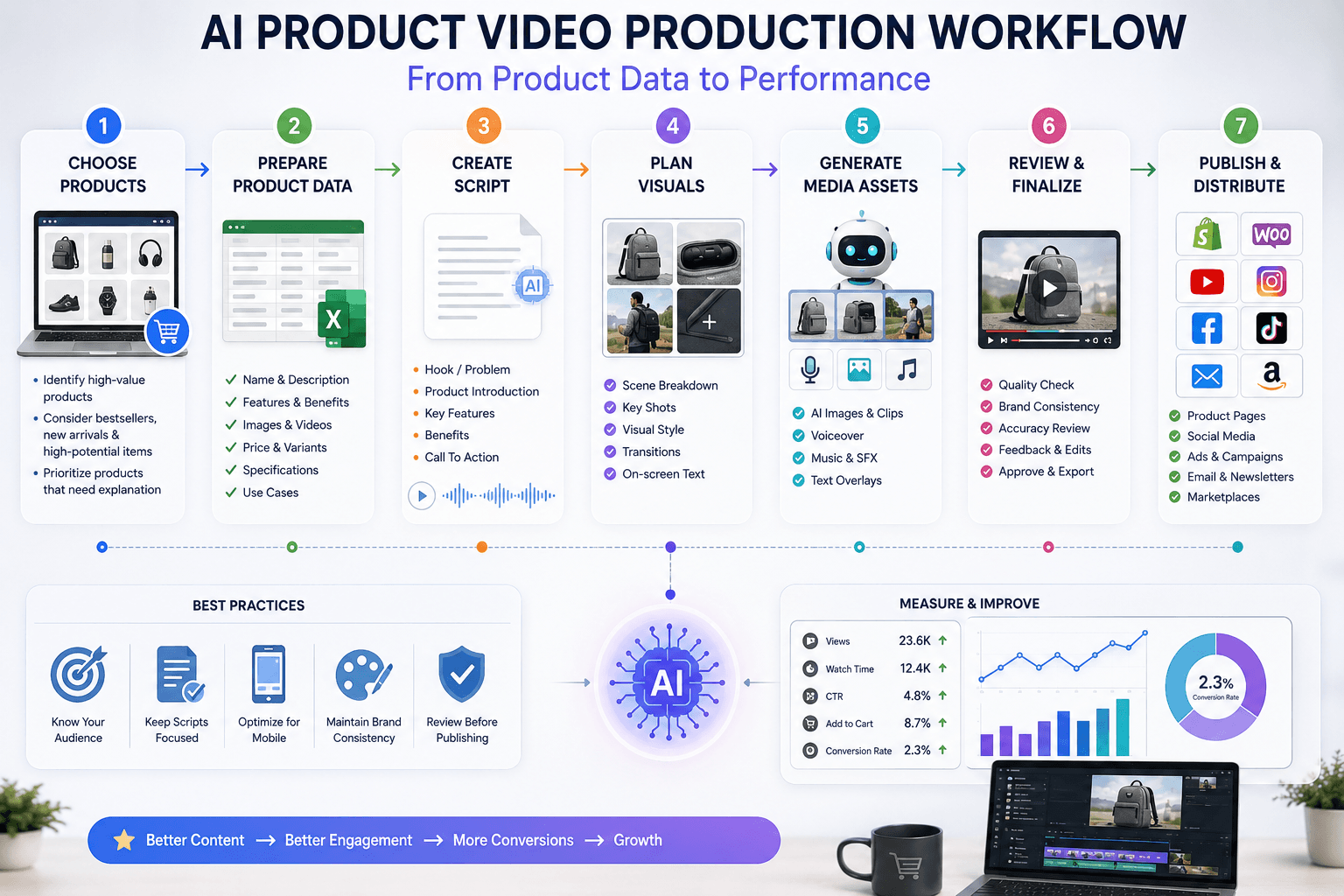
Phase 1: Choose Products
Start with:
- Bestsellers
- High-margin products
- Products with high traffic but low conversion
- New arrivals
- Products that need explanation
- Products used in paid ads
Do not start with the entire catalog.
Phase 2: Prepare Product Data
Create a spreadsheet with:
- Product name
- Product URL
- Product category
- Main benefit
- Three key features
- Target customer
- Product images
- Price range
- Shipping note
- CTA
Phase 3: Create the Script
Use a short template.
Keep it simple.
The script should sound natural, not like a robot.
Phase 4: Create Visual Prompts
Write one visual idea for each line of the script.
Use real product images where possible.
Phase 5: Generate and Assemble
Create the visuals, voiceover, subtitles, and video.
Start with one format, such as 9:16 for reels or 16:9 for product pages.
Phase 6: Review
Check accuracy, brand tone, visual quality, and mobile readability.
Phase 7: Publish and Measure
Add the video to product pages, ads, or social media.
Measure performance.
Track:
- Product page engagement
- Add-to-cart rate
- Conversion rate
- Video watch time
- Ad click-through rate
- Return rate
- Customer questions
Use the results to improve the next batch.
Shopify, WooCommerce, and BigCommerce Use Cases
AI product videos can work across different ecommerce platforms.
Shopify Stores
Shopify brands can use AI videos for product pages, reels, ads, collection campaigns, and email marketing.
Useful areas include:
- Product launch videos
- Variant highlight videos
- Collection videos
- Abandoned cart product reminders
- Seasonal promotions
If you need to improve your Shopify store experience, Zeroradius offers Shopify website development services.
WooCommerce Stores
WooCommerce stores can use videos on product pages, category pages, landing pages, and blog content.
Because WooCommerce runs on WordPress, it also gives flexibility for content marketing and SEO.
You can explore Zeroradius’ WooCommerce website development services for ecommerce stores that need more flexible product content and conversion-focused pages.
BigCommerce Stores
BigCommerce brands can use AI videos for product pages, B2B catalogs, category campaigns, and customer education.
For B2B ecommerce, videos can explain technical product details, use cases, specifications, and ordering workflows.
Zeroradius also provides BigCommerce website development services for growing ecommerce brands.
Should Every Product Have an AI Video?
Not always.
A video is most useful when it helps the customer make a better decision.
You should prioritize videos for:
- Products that need explanation
- Products with high traffic but low sales
- Products with many customer questions
- New products
- High-value products
- Products used in ads
- Products with strong visual appeal
- Products with multiple use cases
For simple products, a short image-based video may be enough.
For complex products, a more detailed explainer may work better.
Final Thoughts
AI product videos can help ecommerce stores create better content faster.
They are useful because product catalogs often contain more content opportunities than teams can handle manually. With the right workflow, AI can help turn product data into scripts, visuals, voiceovers, subtitles, and videos.
But the real value is not only automation.
The real value is better product communication.
When customers understand a product clearly, they are more likely to trust it. When product pages answer questions quickly, shoppers feel more confident. When videos explain benefits visually, the buying journey becomes easier.
AI product videos should not replace good ecommerce strategy. They should support it.
Start with clean product data. Use simple scripts. Plan visuals carefully. Review every output. Measure results. Improve step by step.
For ecommerce brands, this is a practical way to create more useful product content without slowing down the marketing team.
If your online store needs better product pages, conversion-focused content, AI-ready catalog structure, or ecommerce development support, Zeroradius can help you plan and build a stronger ecommerce experience.
Contact Zeroradius to discuss your ecommerce content and conversion strategy.
FAQ
What are AI product videos for ecommerce?
AI product videos are videos created with the help of artificial intelligence using product data, images, scripts, voiceovers, subtitles, and visual prompts. They help explain products faster and make product pages or ads more engaging.
Can AI product videos improve ecommerce conversions?
They can support conversions by helping shoppers understand products better, reducing uncertainty, and making product pages more engaging. Results depend on product quality, page experience, traffic quality, and how well the videos are used.
Do AI product videos replace human video production?
No. AI videos are useful for scalable product content, social media, product pages, and ad testing. Human-led production is still better for premium brand films, complex campaigns, and high-end creative work.
What product data is needed to create AI videos?
Useful data includes product name, short description, key features, benefits, target customer, product images, size, material, price range, variants, usage instructions, and shipping notes.
Are AI-generated product videos safe for ecommerce?
They can be safe if they are reviewed carefully. Brands should check that the video shows the correct product, features, colors, materials, and claims before publishing.
Where should ecommerce stores use AI product videos?
They can be used on product pages, social media, paid ads, email campaigns, landing pages, marketplace listings, and product launch campaigns.
Should I add videos to every product page?
Not necessarily. Start with high-value products, bestsellers, products with high traffic but low conversion, new arrivals, and products that need explanation.