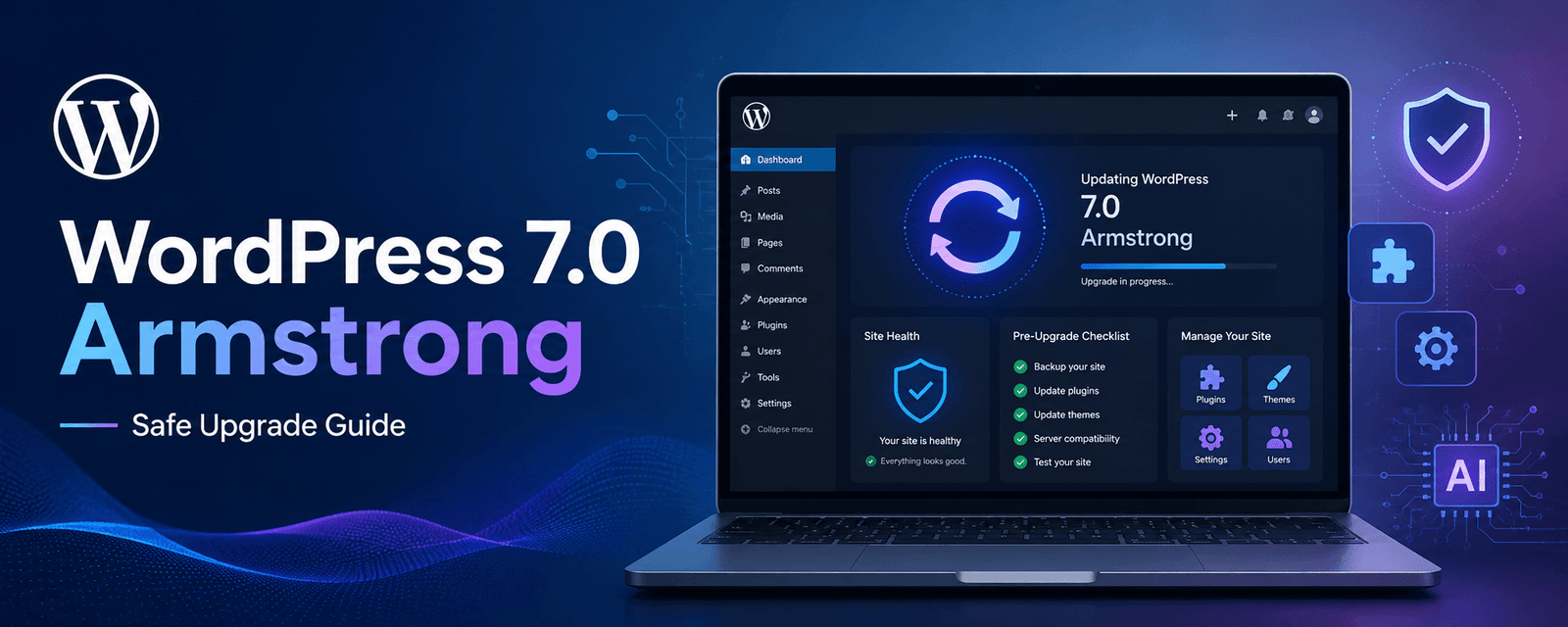
WordPress 7.0, also known as “Armstrong,” is one of the most important WordPress updates in recent years. It brings a cleaner admin experience, new editor improvements, early AI integration, better design tools, and useful workflow features for content teams, developers, agencies, and business owners.
But like every major WordPress update, it should not be installed blindly on a live website.
If your website uses custom functionality, WooCommerce, page builders, SEO plugins, caching tools, or older themes, you need to test everything properly before upgrading. A smooth update can improve your workflow, but a rushed update can break layouts, forms, checkout pages, or important plugin features.
In this guide, we’ll explain what is new in WordPress 7.0, what you should check before upgrading, and how to update your website safely without affecting performance, SEO, or user experience.
What Is WordPress 7.0 Armstrong?
WordPress 7.0 Armstrong is a major WordPress release focused on modern website management. It introduces a more polished admin dashboard, AI-ready infrastructure, improved block editing, collaboration features, better design controls, and developer-focused improvements.
The update is especially useful for businesses and agencies that manage content-heavy websites, WordPress blogs, WooCommerce stores, and client websites.
However, the biggest point to understand is this: WordPress 7.0 is not just a visual update. It prepares WordPress for the next stage of website development, where AI, automation, collaboration, and smarter workflows become part of everyday website management.
If you are planning to build or upgrade a WordPress website, explore our WordPress website development services.
Why WordPress 7.0 Matters for Website Owners
Many website owners think of WordPress updates as simple technical maintenance. But WordPress 7.0 is more than that. It affects how users manage content, how developers build custom features, how teams collaborate, and how AI tools may work inside WordPress in the future.
For businesses, this update matters because your website is not just an online brochure. It is connected to SEO, lead generation, customer trust, conversions, speed, security, and brand experience.
A properly upgraded WordPress website can become easier to manage, faster to update, and more flexible for future growth. But if the update is handled carelessly, it can create issues with plugins, themes, forms, layouts, or checkout pages.
Key New Features in WordPress 7.0
WordPress 7.0 includes several useful improvements. Some are visible to everyday users, while others are more important for developers and agencies.
1. A Cleaner and More Modern Admin Dashboard
WordPress 7.0 introduces a refreshed admin experience with better spacing, cleaner typography, smoother screen transitions, and a more modern look.
This may sound like a small change, but it improves the daily experience for content editors, marketers, bloggers, and business owners who use the dashboard regularly.
A cleaner dashboard can make it easier to manage posts, pages, settings, media, and plugins without feeling overwhelmed.
2. Command Palette for Faster Navigation
One of the most useful additions in WordPress 7.0 is the Command Palette. It allows users to quickly search and access posts, pages, templates, plugin settings, and admin screens from one place.
For example, instead of clicking through multiple menu items, users can open the Command Palette and jump directly to the section they need.
This is especially helpful for agencies, developers, and content teams managing large websites with many pages, posts, templates, and settings.
3. Native AI Infrastructure
WordPress 7.0 introduces an AI-ready foundation inside WordPress core. This does not mean every website automatically gets full AI features after upgrading. Instead, WordPress is building the structure that future AI-powered tools, plugins, and workflows can use.
This is important because AI is already becoming part of content creation, SEO, image optimization, website automation, customer support, and performance analysis.
In the future, WordPress users may see more AI-powered features for writing content, improving SEO, generating alt text, creating summaries, suggesting layouts, and automating website tasks.
You can also read our guide on AI WordPress management to understand how AI can help automate WordPress tasks and improve website workflows.
4. Better Collaboration Tools
WordPress 7.0 also improves editorial collaboration. Teams can work more smoothly with features such as notes, suggestions, mentions, and improved revision handling.
Real-time collaboration is not fully available yet, but the new collaboration improvements are still useful for content teams, agencies, and businesses that need internal review before publishing.
For example, a content writer can draft a page, an SEO specialist can suggest improvements, and a manager can review changes before the content goes live.
5. New Blocks and Editor Improvements
WordPress 7.0 improves the block editor with new blocks and better design controls. These updates can reduce dependency on small helper plugins and make it easier to create better page layouts directly inside WordPress.
Some useful improvements include better heading controls, gallery lightbox options, icon blocks, breadcrumbs, typography improvements, and responsive design controls.
This is good news for businesses that want flexible websites without depending too much on extra plugins.
If you want to understand why WordPress continues to stay strong, read our article on why WordPress still dominates in 2026.
What Can Break After Updating to WordPress 7.0?
Most well-maintained websites should upgrade smoothly. But websites with older plugins, custom themes, advanced page builders, WooCommerce, or custom code should be tested carefully.
Here are the main areas you should check before updating your live website.
1. Plugin Compatibility
Plugins are often the biggest risk during major WordPress updates. SEO plugins, page builders, caching plugins, form plugins, security tools, custom plugins, and WooCommerce extensions should all be checked before upgrading.
Before updating WordPress core, update your plugins on a staging site and test whether everything still works correctly.
Important plugins to test include:
- SEO plugins such as Yoast SEO or Rank Math
- Page builders such as Elementor, Divi, Beaver Builder, or Gutenberg add-ons
- Caching and performance plugins
- Form plugins such as WPForms, Gravity Forms, or Contact Form 7
- Security plugins
- WooCommerce and payment gateway plugins
- Custom-built plugins
If your SEO plugin does not save metadata correctly after the update, it can affect your search appearance. If your form plugin fails, leads may stop reaching your inbox. If WooCommerce checkout breaks, sales can be affected directly.
That is why plugin testing should never be skipped.
2. Theme Compatibility
Your theme controls the appearance and layout of your website. If your theme uses old code, custom admin styling, hard-coded mobile menus, or outdated functions, it may behave differently after the update.
After upgrading on staging, check your homepage, service pages, blog pages, mobile menu, footer, forms, CTA sections, and important landing pages.
Pay special attention to mobile responsiveness. Many layout problems become visible only on mobile devices.
3. WooCommerce Checkout Flow
If you run a WooCommerce store, do not update without full testing.
You should test the complete shopping journey:
- Product page
- Add to cart
- Cart page
- Checkout page
- Payment gateway
- Order confirmation email
- Admin order view
- Coupon codes
- Shipping calculations
Even a small issue in checkout can affect revenue. For high-traffic ecommerce websites, it is better to wait a short period after release, test everything on staging, and then update production during low-traffic hours.
If your business needs a reliable online store, explore our eCommerce store development services.
4. Website Speed and Caching
After a major WordPress update, caching and performance settings should be reviewed. Some optimization plugins may need to be reconfigured or cleared after the update.
After upgrading, clear all caches and test your website speed again. Check Core Web Vitals, mobile performance, image loading, CSS/JS optimization, and page load time.
For better performance planning, read our Core Web Vitals optimization guide.
5. Custom Code and Admin Scripts
Websites with custom code need extra attention. If your website uses custom JavaScript, custom admin tools, custom blocks, or older editor modifications, they should be reviewed before upgrading.
Some custom scripts may behave differently due to changes in the editor and admin experience. A developer should check whether the code still works correctly after the update.
PHP Compatibility: A Major Upgrade Check
Before upgrading to WordPress 7.0, check your PHP version. WordPress 7.0 requires a newer PHP environment compared to older sites still running outdated versions.
If your hosting server uses an older PHP version, your website may not be ready for the update. In some cases, the update may not even be available until PHP is upgraded.
You can check your PHP version from your WordPress dashboard by going to:
Tools → Site Health → Info → Server
A safer approach is to upgrade PHP on a staging site first, test your website fully, and then apply the PHP upgrade to the live site before updating WordPress core.
Avoid upgrading PHP and WordPress core at the same time on a live site. If something breaks, it becomes harder to identify the cause.
Safe WordPress 7.0 Upgrade Checklist
Here is a simple checklist you can follow before updating your website to WordPress 7.0.
- Take a full website backup, including files and database.
- Confirm that your backup can be restored.
- Check PHP and database versions.
- Create or refresh a staging website.
- Update plugins and themes on staging first.
- Update WordPress core on staging.
- Test the homepage, service pages, blog pages, and landing pages.
- Test all forms and email notifications.
- Test WooCommerce checkout if applicable.
- Check mobile layouts and navigation.
- Clear caches and test website speed.
- Review SEO titles, meta descriptions, and schema settings.
- Schedule the live update during low-traffic hours.
- Keep a rollback plan ready.
If your website is important for leads, sales, bookings, or customer communication, do not update without a proper plan.
For safe updates, backups, and ongoing support, explore our website migration and maintenance services.
Should You Update to WordPress 7.0 Immediately?
The answer depends on the type of website you have.
If you have a simple business website, blog, or brochure website with updated plugins and a modern theme, you can update after testing on staging.
If your website uses WooCommerce, memberships, learning management systems, custom plugins, heavy page builders, or older themes, it is better to wait, test carefully, and update in phases.
For high-risk websites, a phased approach is safer:
- Week 1: Audit PHP, plugins, themes, and custom code.
- Week 2: Update low-risk websites such as blogs and brochure sites.
- Week 3: Update medium-risk websites such as membership or content-heavy sites.
- Week 4: Update WooCommerce, LMS, and custom websites after deeper testing.
This approach reduces risk and gives plugin developers time to release compatibility fixes if needed.
What WordPress 7.0 Means for SEO
WordPress 7.0 can support better SEO workflows, but the update alone will not improve rankings automatically.
SEO still depends on content quality, technical performance, structured data, user experience, internal linking, mobile usability, and trust signals.
After updating, check whether your SEO plugin is working properly. Make sure meta titles, descriptions, schema markup, canonical URLs, sitemaps, and breadcrumbs are still correct.
You should also review your important pages and update old content where needed. A major WordPress update is a good time to clean your website, improve performance, and strengthen your SEO foundation.
If you use AI tools for WordPress SEO, read our guide on AI SEO plugins for WordPress.
What WordPress 7.0 Means for AI and Automation
One of the biggest changes in WordPress 7.0 is its AI-ready direction. WordPress is preparing the platform for deeper AI-powered workflows.
In the future, AI may help WordPress users with:
- Content ideas
- Meta title and description suggestions
- Image alt text
- Content summaries
- Internal linking suggestions
- Page layout recommendations
- SEO improvements
- Workflow automation
- Website maintenance tasks
However, AI should support human strategy, not replace it. Businesses should still review AI-generated content, check facts, maintain brand tone, and focus on useful content that helps real users.
You can also explore our guide on how AI is changing WordPress website design in 2026.
Common Mistakes to Avoid During the WordPress 7.0 Update
Many website issues happen because updates are done too quickly. Avoid these mistakes when upgrading to WordPress 7.0:
- Updating directly on the live site without staging.
- Skipping backups.
- Updating WordPress core before updating plugins and themes.
- Ignoring PHP compatibility.
- Not testing contact forms.
- Not testing checkout on ecommerce websites.
- Forgetting to clear cache after the update.
- Ignoring mobile layout changes.
- Not checking SEO plugin settings after the update.
- Updating during peak traffic hours.
A careful update process can prevent downtime, broken layouts, lost leads, and customer frustration.
Final Thoughts
WordPress 7.0 Armstrong is an important update for the future of WordPress. It brings a cleaner admin experience, useful editor improvements, AI-ready infrastructure, better workflows, and new design possibilities.
But businesses should not treat it like a small plugin update. If your website depends on custom code, WooCommerce, page builders, SEO plugins, or complex integrations, testing is essential.
The safest approach is simple: back up your site, test everything on staging, check PHP compatibility, review plugins and themes, and update the live website only when you are confident everything works properly.
WordPress 7.0 is not just about updating software. It is about preparing your website for a smarter, faster, and more AI-ready future.
If your business wants a future-ready WordPress website, explore our WordPress website development services.
Frequently Asked Questions
1. What is WordPress 7.0 Armstrong?
WordPress 7.0 Armstrong is a major WordPress release that introduces a modern admin experience, AI-ready infrastructure, improved block editing, better design tools, collaboration improvements, and developer-focused updates.
2. Should I update to WordPress 7.0 immediately?
You should not update immediately on a live website without testing. First, create a staging site, update plugins and themes, test all important pages and features, and then update the live site during low-traffic hours.
3. Can WordPress 7.0 break my website?
Most updated websites should work fine, but websites using older plugins, custom themes, WooCommerce, heavy page builders, or custom code may face issues if they are not tested before upgrading.
4. Does WordPress 7.0 include AI features?
WordPress 7.0 introduces AI-ready infrastructure that allows future AI-powered tools and plugins to work more smoothly inside WordPress. AI features may still depend on plugins, integrations, and external provider setup.
5. What should I check before upgrading to WordPress 7.0?
Before upgrading, check your PHP version, plugin compatibility, theme compatibility, forms, SEO settings, WooCommerce checkout, mobile layouts, caching setup, and website speed. Always take a full backup first.
6. Is WordPress 7.0 good for SEO?
WordPress 7.0 can support better website management and SEO workflows, but it does not automatically improve rankings. You still need strong content, technical SEO, fast performance, schema markup, internal links, and a good user experience.
7. Do WooCommerce websites need extra testing before updating?
Yes. WooCommerce websites should be tested carefully before updating. Check product pages, cart, checkout, payment gateways, order emails, coupons, shipping, and admin order management before pushing the update live.