
A website that worked in an AI tool's preview can fail as soon as your team installs it, changes content, or opens it on a phone. The useful response is to collect evidence before asking for another round of generated fixes. Some projects need a small correction; others need a structural repair or a new implementation.
To fix broken AI-generated website code, reproduce each failure in a controlled environment, trace it to its source, rank it by business impact, and verify the repair against the original failure and nearby journeys. This guide is for business owners and project leads who need to brief a developer and decide whether the existing code is worth keeping. It does not assume every AI-generated project is defective.
Record the symptom before changing the code
Ask for the complete repository or export, a dependency lockfile, setup instructions, and the exact preview that was approved. Preserve a copy of the current version in source control. Have the developer run a clean install, development server, tests if present, and production build. A build error, a browser console error, and a broken form are different failures and may have different causes.
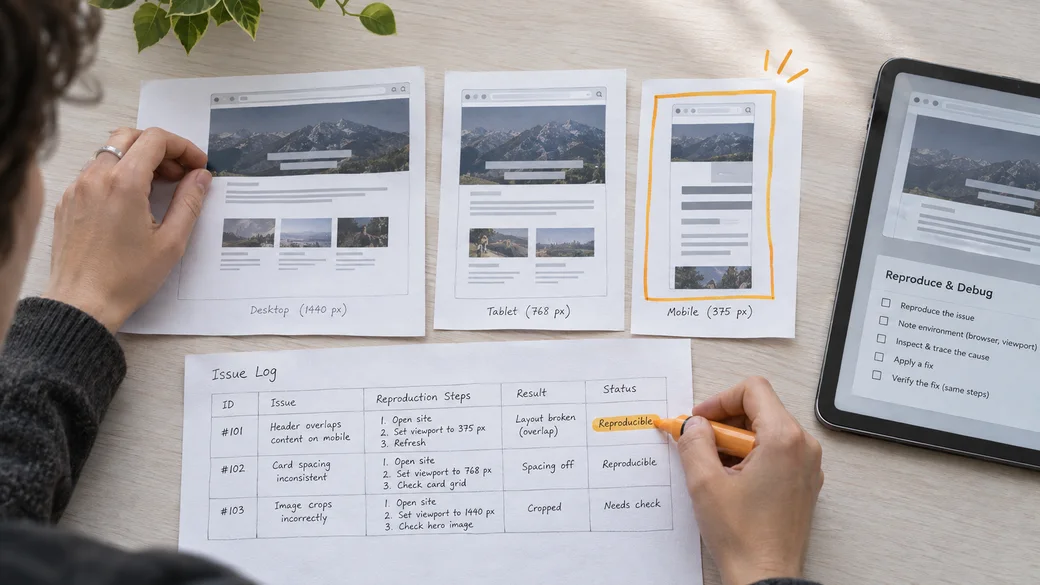
Write one issue per observable symptom: the affected URL, browser, viewport width, action, expected result, actual result, and a screenshot or error message. Note whether it happens consistently or only after a particular edit. This small record prevents a visual patch from hiding the original problem.
Need help applying this to your website?
Turn the article into a focused action plan.
Get support with design, development, SEO, AI, or performance improvements based on what your business actually needs next.
Audit the code in the order visitors depend on it
Start with build and dependency failures
Check the documented runtime and package versions, missing imports, unsupported APIs, configuration, and environment variables. Review dependency warnings and licenses before replacing packages. If a generated component imports a library that is absent, first find out whether the feature needs that library at all. Avoid installing packages merely to quiet an error.
Trace visible errors to actual behavior
Inspect the browser console and failed network requests, then follow the relevant component, route, and data flow. A button may look active while only changing local state; a form may display success without sending anything. For each important journey, check what data is entered, where it goes, how success is confirmed, and what happens when the service is unavailable. Validate submissions on the server as well as in the browser; MDN's form validation guidance explains the limits of client-side checks.
Review layouts and accessibility with real content
Test representative phones, tablets, and desktops with long headings, error messages, and realistic media. Check overflow, cropped controls, keyboard navigation, focus visibility, labels, and error announcements. Use WCAG 2.2 as a testable accessibility reference. A screen that looks right at one fixed width may still fail for visitors using another device or input method.
Check security in proportion to the site's risk
Look for credentials in client code, committed secrets, overly broad permissions, unvalidated input, and account flows without access checks. If a credential may have been exposed, have its owner rotate it and review access. Do not label every generated codebase unsafe without evidence. The OWASP Application Security Verification Standard helps teams choose appropriate verification requirements for web applications.
Use a reproducible repair workflow
- Freeze the starting point. Save the current version and capture a clean build result, console output, and failing journey.
- Isolate one cause. Trace the smallest route, component, dependency, or integration that explains the symptom. Record assumptions that still need confirmation.
- Choose the smallest durable change. Fix the underlying rule or data flow, not only the screenshot. Keep reusable behavior in shared components when several pages depend on it.
- Reproduce the original steps. Confirm the failure is gone in the same environment, then test adjacent routes, viewports, and failure states.
- Document the result. Record the changed files, remaining limitations, tests performed, and any new setup or maintenance requirement.
For example, a mobile card grid may overlap because a generated layout uses fixed widths. A durable fix could replace those widths with responsive constraints and test the longest real card text. Merely reducing the font size in one screenshot can leave the next content edit broken.
Decide between targeted fixes, refactoring, and a rebuild
Use targeted fixes when the build is reliable, the structure is understandable, and failures are isolated. Refactor when repeated components, tangled state, or inconsistent data handling make each small change risky, but the underlying framework and assets remain useful. Rebuild when critical source is missing, central journeys are simulated throughout, dependencies cannot reasonably be maintained, or the architecture conflicts with the required platform.
Ask for a short estimate of both repair and rebuild work, with assumptions and acceptance criteria. Include time for testing and handoff, not just code changes. The choice depends on the observed state of this project and the business requirements. If you are still deciding what a generated prototype needs for launch, our prototype-to-production guide covers the broader handoff.
Verify the repaired website as a complete experience

Run a clean build and the project's tests. Check navigation, forms, content editing, account or checkout flows where relevant, loading and error states, and the browsers the business supports. Add regression tests for faults that could easily return, especially data transformations and critical submissions. Keep a human review for content, visual layout, and keyboard use.
Before release, use staging with realistic configuration, document deployment and rollback, and transfer ownership of the repository, credentials, and maintenance tasks. A repair is complete when the team can reproduce the checks and make the next change without reopening the same failure.
Audit checklist to share with a developer
- Provide source, assets, lockfile, setup steps, and the approved preview.
- List each failing URL and action with expected and actual behavior.
- Record build, console, and network errors without exposing credentials.
- Identify mock data, hard-coded content, and forms that do not reach a real destination.
- Test mobile and desktop layouts, keyboard use, and browser compatibility.
- Review secret handling, input validation, access rules, and dependency health.
- Compare scoped fix, refactor, and rebuild estimates with testing included.
- Require regression checks, change notes, and a handoff plan.
Two common mistakes are fixing only the first visible error and asking a code generator to rewrite an entire project without preserving a working baseline. Both make it harder to know whether the site has improved. Keep the issue log and acceptance checks throughout the work.
Get a scoped repair plan
Bring the source, failure log, and required customer journeys to a Zeroradius project review. For a content-led business site that needs dependable editing and a maintainable implementation, our WordPress website development company service can help scope the repair or rebuild and its testing. Start with the audit checklist so the next step addresses the actual failures.
Have questions?
The preview and local environment may use different dependencies, configuration, or runtime versions. A clean install and build log help identify the exact difference before any code changes.
Investigate warnings and rank them by impact. A warning may reveal a real compatibility or accessibility issue, while another may be low priority. Do not use a clean console alone as proof that the important journeys work.
Submit valid and invalid test entries on staging. Confirm that the intended destination receives the data, the user sees accurate feedback, and failures are recorded and handled appropriately.
Consider a rebuild when essential source is unavailable, central functionality is mostly simulated, or the structure makes every change costly. Compare scoped repair and rebuild estimates using the same requirements and tests.
Repeat the original failing steps, then check nearby pages and shared components, mobile layouts, forms, accessibility, and a clean build. Add automated regression checks for critical behavior where they will prevent a repeat failure.