Most B2B projects on Shopify do not fail because a feature is missing. They struggle because the wholesale process was never written down before the build started. Who can place an order for a customer account? Which prices does each buyer see? Who approves a large order, and when does the invoice fall due? If those answers are unclear, the theme, the apps, and the integrations get built around guesses.
The short answer: Shopify now includes native B2B tools on its Basic, Grow, Advanced, and Plus plans, but what you can do depends on your plan, your customer account setup, and the systems Shopify must exchange data with. On April 2, 2026, Shopify expanded core B2B features to Basic, Grow, and Advanced; older guides may still describe B2B as Plus-only. Shopify's B2B features by plan page shows that companies, quantity rules, volume pricing, net terms, and draft-order invoicing are available across those plans, while unlimited catalogs, direct catalog assignment, deposits, and partial payments are Plus features. B2B is not available on the Starter or Retail plans.
This guide is for wholesale managers, ecommerce leads, and business owners preparing a Shopify B2B ecommerce project. It explains what to define before development, which requirements Shopify handles natively, where apps or custom work may be needed, and the limitations that should shape your plan choice.
Shopify B2B planning checklist
- Document how trade buyers currently order, who approves orders, and how they pay.
- Map each customer business into companies, company locations, and buyer contacts with the right permissions.
- Decide which products and prices each buyer group sees, and how many catalogs that requires.
- Define quantity minimums, maximums, increments, and volume price breaks per product variant.
- Choose payment terms, deposit needs, PO number rules, and whether orders need review before confirmation.
- Name the system of record for products, prices, inventory, customers, orders, and invoices.
- Confirm shipping, tax, reporting, and staff workflows for B2B orders separately from retail orders.
- Check your target plan against every requirement, then list what needs an app, an integration, or custom development.
Ready to improve your Shopify store?
Get a sharper plan for Shopify growth.
Talk through theme decisions, speed issues, merchandising, product discovery, and conversion improvements with the Zeroradius team.
1. Start with buyer workflows, not features
A feature list such as "price lists, net terms, quick order" is not a requirements document. Begin with the real buying journey. Interview your sales team and two or three representative customers. Ask how they reorder, how many SKUs a typical order contains, whether they order for one site or several, and what slows them down today.
Write each workflow as a short sequence. For example: a purchasing manager at a restaurant group logs in, opens the location for one branch, reorders last month's items, adds a PO number, and checks out on Net 30 terms. That one sentence already tells you that you need company locations, reorder support, PO numbers, and payment terms. It also tells you that accelerated wallet checkouts are not part of the journey, which matters because Shopify lists them as incompatible with B2B.
Also decide whether B2B and retail customers will share one store or use separate stores. Shopify supports both approaches. A blended store keeps catalog and content management in one place but means some store-wide settings apply to both customer types. A B2B-only store gives wholesale buyers a cleaner experience at the cost of managing another storefront.
2. Company accounts, buyer roles, and permissions
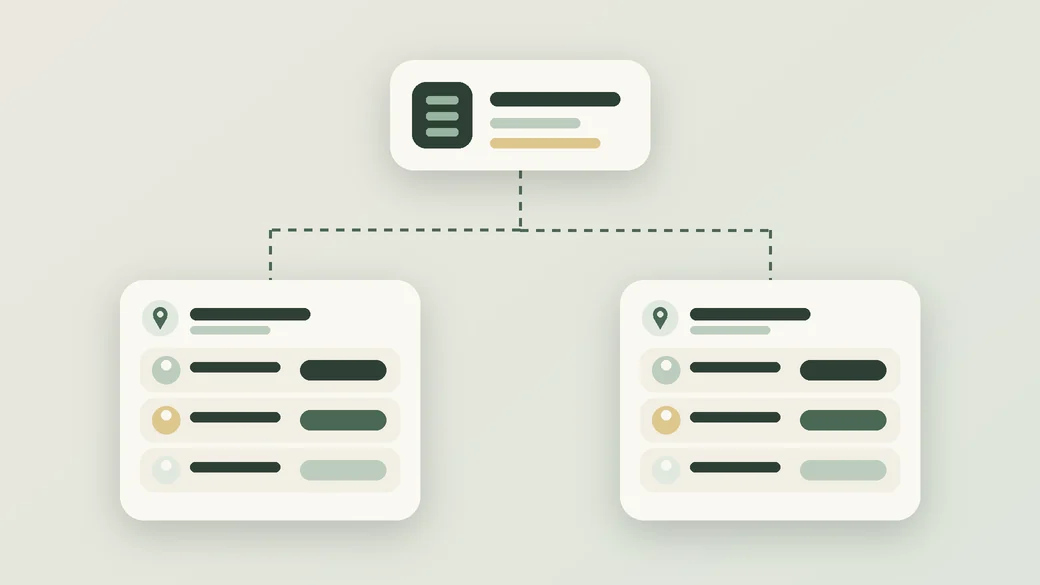
Shopify models a B2B customer as a company. A company can have multiple locations, and each location can have its own buyers, payment terms, and shipping and billing addresses. Buyer contacts receive location-level permissions. Shopify's plan table describes these as admin and ordering-only permissions, available on Basic, Grow, Advanced, and Plus.
Plan this structure before importing anyone:
- Company: the legal or trading entity you invoice.
- Location: a branch, store, warehouse, or department with its own address and buying rules.
- Contacts: the people who can order, and whether they can only place orders or also manage the location.
Two requirements are easy to miss. First, Shopify states that B2B requires customer accounts and that legacy customer accounts cannot be used for B2B customers or orders. If your store still relies on legacy accounts or a theme customized around them, budget for that change. Second, if you want prospective buyers to apply online, Shopify offers a company account request form, but you still need an internal approval process and clear criteria for who qualifies.
If your sales team places orders for customers, check sales staff permissions. Shopify lists them on Grow, Advanced, and Plus, but not Basic.
3. Catalogs, price lists, quantity rules, and minimum orders
Catalogs control which products and prices B2B buyers see. This is where plan choice often becomes concrete. On Basic, Grow, and Advanced, Shopify allows three active catalog assignments across active B2B markets. Plus has no such limit and also allows catalogs to be assigned directly to a company or company location.
Count your pricing groups before you choose a plan. A distributor with "trade", "volume", and "key account" tiers might fit within three catalogs. A business that negotiates prices per customer usually will not, and that requirement points toward Plus or an alternative pricing approach. Do not force dozens of negotiated price agreements into three tiers just to avoid the conversation.
Shopify also supports quantity rules on all B2B-enabled plans. You can set a minimum, maximum, and increment per variant, which handles requirements such as "sold in cases of 12" or "minimum 24 units". Quantity price breaks, often called volume pricing, let a buyer receive a lower unit price at set quantities.
Be careful with the phrase "minimum order requirement". Quantity rules work at the variant level. If your rule is a minimum order value across the whole cart, such as a minimum spend per order, confirm how you will enforce it. That may need checkout validation through Shopify Functions, an app, or a manual review step. Test the approach on your plan before promising it to customers.
| Requirement | Native on Basic, Grow, Advanced | Plus only |
|---|---|---|
| Companies, locations, contact permissions | Yes | Also included |
| Catalogs | Up to 3 active catalog assignments across active B2B markets | Unlimited, with direct assignment to companies or locations |
| Quantity rules and volume pricing | Yes | Also included |
| Net terms, vaulted cards, payment reminders, PO numbers | Yes | Also included |
| Deposits, partial payments, payment requests per fulfillment | No | Yes |
| Sales staff permissions | Grow and Advanced | Also included |
| Contextual storefront and checkout through Shopify Markets | Advanced | Also included |
Source: Shopify Help Center, Shopify B2B features by plan. Check the page again before committing, because plan features change.
Markets rollout: Shopify's plan table lists contextual storefront and checkout on Advanced and Plus, but its current B2B with Markets guidance also says the new Markets functionality is being activated through a feature test drive. Confirm the store's eligibility and activation status before making a Markets-dependent workflow a launch requirement.
4. Payment terms, quotes, and purchasing workflows
Shopify's B2B feature overview lists payment terms of Net 7, 15, 30, 45, 60, or 90 days, or due on fulfillment. Vaulted credit cards, payment reminders, ACH for US stores, and PO numbers are available on every B2B-enabled plan. Deposits on terms, partial payments, and payment requests per fulfillment are Plus features.
For order review, Shopify offers checkout to draft. You can require a company location's orders to arrive as drafts, then review, edit, and confirm them with the customer. Draft orders can also be converted into invoices. For many wholesalers, this covers the practical need behind "we need quotes".
A formal quoting process is different. If buyers need to request a quote, receive a priced proposal with an expiry date, go through internal approval stages, and convert the accepted quote into an order, check whether draft orders cover enough of it. If they do not, scope an app or custom development, and confirm it is compatible with B2B checkout and customer accounts.
Also note what B2B checkout does not support. Shopify lists accelerated checkouts such as Shop Pay, Apple Pay, Google Pay, and Amazon Pay, tipping, subscriptions, agentic storefronts, and checkout.liquid customizations as incompatible. It caps orders and draft orders at 500 line items. If customers submit very large orders or buy on subscription, that needs a plan before development, not after launch. Review Shopify's current B2B requirements and limitations before finalizing the scope. For checkout changes, our guide to Shopify checkout customization explains which modifications are supported.
5. ERP, CRM, inventory, and accounting integrations
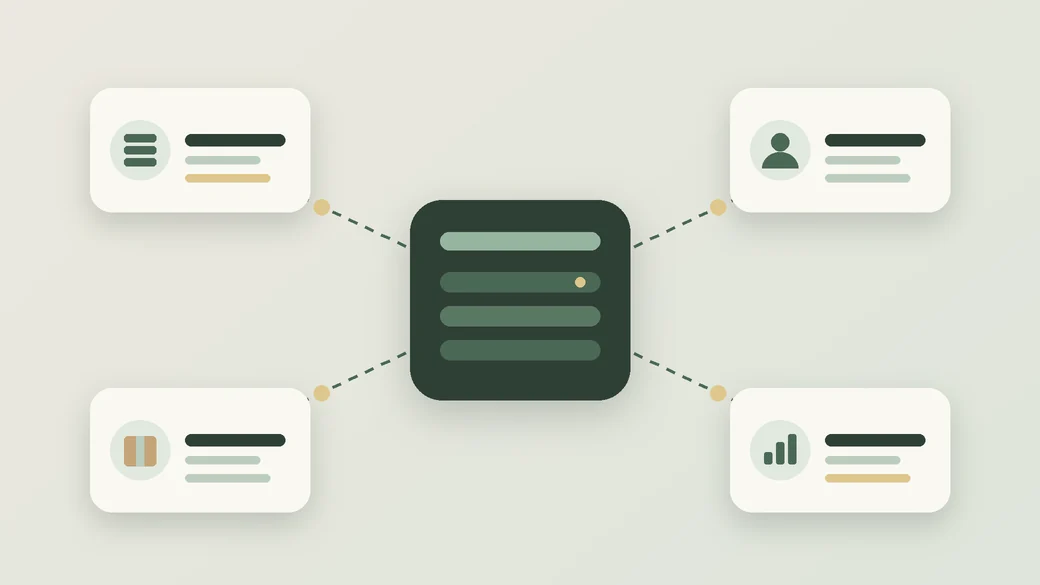
In B2B, the store rarely owns the customer record or the price. Customer-specific prices often live in an ERP. Credit limits sit in accounting. Account managers work in a CRM. Shopify's B2B APIs can support these integrations, and Shopify notes that prebuilt integrations are available for ERP and accounting platforms, as well as custom builds. Before scoping bespoke API work, confirm the developer's eligibility: Shopify currently limits access to B2B Admin API resources to development stores, Shopify Plus Partners, and Shopify affiliates, with Plus development stores required for Plus Partners. Review the current Shopify B2B API limitations before committing to a custom integration route.
Before choosing a connector, write a data ownership map:
- Companies and locations: created in Shopify, the ERP, or the CRM?
- Catalogs and prices: maintained in Shopify or pushed from the ERP?
- Inventory: which system holds available stock, and how often does Shopify update?
- Orders and invoices: does Shopify send orders to the ERP, and does payment status flow back?
- Payment terms and credit: who decides a buyer's terms, and what happens if an account is on hold?
Then define failure handling. What happens when a price sync fails overnight, or the same order is sent twice? Integrations need logging, alerts, and a reconciliation routine. Our Shopify app integration checklist covers permissions, testing, and ongoing support. For connectors between Shopify and existing business systems, Zeroradius provides Shopify app integration services.
6. Shipping, taxes, reporting, and operations
B2B orders often ship differently from retail orders: pallets, freight, split deliveries, or account-specific carriers. Confirm how rates will be calculated for each company location. Local delivery and pickup points are incompatible with B2B checkout; local delivery and pickup in store can be used as shipping options on B2B draft orders created in the admin. Pickup in store, abandoned checkouts, and gift cards at checkout are off by default for B2B checkout and require Shopify Support to activate.
Tax needs the same care. Trade customers may be tax-exempt or need specific tax handling per location. Settle this with your accountant before data entry, and test it on real customer scenarios.
For reporting, agree how the business will separate B2B and retail revenue, margins, and order volume. Shopify Flow supports B2B objects on every B2B-enabled plan, which helps automate tasks such as tagging or notifying staff. Map those workflows during planning so operations staff are not left processing exceptions manually.
7. Plan eligibility, limitations, and alternatives
Use your requirements list to choose the plan, not the other way around:
- Basic, Grow, or Advanced can suit businesses with a few price tiers, standard net terms, and straightforward approval needs.
- Advanced adds contextual storefront and checkout through Shopify Markets for blended stores.
- Plus fits when you need more than three active catalogs, per-company catalog assignment, deposits, partial payments, or payments per fulfillment, alongside the wider customization Plus allows.
When a requirement is not native, decide between three routes: a compatible app, a custom app or Shopify Function where plan and API access allow it, or a change to the process. Shopify Functions are available through public apps on B2B-enabled plans, while custom apps containing Functions require Plus. Prefer the simplest route that meets the need. Document every app decision with the data it owns, the cost, and the fallback if it stops being supported.
Shopify is not the right fit for every B2B operation. If your model depends on subscriptions for trade buyers, very large order sizes, or deep quoting workflows, compare the effort on Shopify against other platforms. If your business already runs on WordPress, WooCommerce B2B development may be worth evaluating.
Common Shopify B2B planning mistakes
- Choosing a plan before counting catalogs. The three-catalog limit outside Plus is a frequent reason for late plan changes.
- Ignoring the customer accounts requirement. Legacy customer accounts cannot be used for B2B, so theme and app changes may be needed.
- Treating "minimum order" as one requirement. Variant quantity rules and cart-level minimum spend need different solutions.
- Assuming retail checkout features carry over. Accelerated checkouts, subscriptions, and tipping are not available in B2B checkout.
- Leaving data ownership undecided. Without a clear system of record, prices and inventory drift between the ERP and Shopify.
- Testing only one buyer. Test multiple companies, locations, permissions, catalogs, and payment terms, including failed or held accounts.
Planning a Shopify B2B store?
A reliable B2B build starts with mapped buyer workflows, a catalog count, a data ownership plan, and an honest list of what needs an app or custom work. If your requirements point to unlimited catalogs, deposits, or deeper checkout customization, Zeroradius Shopify Plus development services can help you scope the store, its integrations, and a tested launch plan.
Have questions?
Not always. Shopify lists B2B on Basic, Grow, Advanced, and Plus. Plus is needed for features such as more than three active catalogs, direct catalog assignment to companies or locations, deposits, partial payments, and payment requests per fulfillment. B2B is not available on Starter or Retail.
Yes. Shopify supports blended stores where B2B and direct-to-consumer customers shop in one store, as well as separate B2B-only stores. In a blended store, some settings apply to both customer types, and contextual storefront and checkout through Shopify Markets require Advanced or Plus.
Yes. Shopify supports Net 7, 15, 30, 45, 60, or 90 day terms and due-on-fulfillment terms on B2B-enabled plans. Deposits on terms and partial payments are available only on Plus.
Shopify's native option is checkout to draft, where orders arrive as drafts that you can review, edit, and confirm. Draft orders can also become invoices. A formal quote workflow with expiry dates or multi-step approval usually needs an app or custom development.
Yes. Shopify provides B2B APIs and notes that prebuilt ERP and accounting integrations are available, with custom integrations as another option. Define which system owns companies, prices, inventory, orders, and invoices before choosing a connector.
Variant quantity rules handle minimum quantities for individual products. A minimum spend across the whole cart is a separate requirement and may need a cart and checkout validation Function, a compatible app, or an order-review process. Confirm the solution on your plan before launch.
Yes. Shopify provides a company account request form that lets prospective buyers request access. Your team still needs to review each request, decide who qualifies, and define how approved companies and locations are set up.
Yes. Payment terms can be set for a company or company location, so branches can follow different agreed schedules. Define where those terms are maintained and how changes reach Shopify if another system is the source of truth.